My Home Lab Documentation
Documentation for my home lab CI/CD setup
LORIC - Orchestrator Node (Gitea) - RETIRED
Status: This system has been retired as part of the MK-1 to MK-2 homelab transition. Documentation is retained for archival purposes.
- Hostname: LORIC
- Type: Raspberry Pi 3 B+
- IPv4 Address:
192.168.0.122(STATIC) - IPv6 Address: Any/Unused (Dynamic)
- Assigned IPv4 DNS:
192.168.0.125(ENLIL) - Assigned IPv6 DNS:
2a00:23c7:593:6501:ba27:ebff:fe0f:e3f2(ENLIL) - Architecture: ARMv7 (Raspberry Pi 3 B+)
Purpose
LORIC acts as the dedicated orchestrator node within the home-lab CI/CD infrastructure. It is responsible for polling the Gitea server on CASPER, orchestrating workflow execution, and dispatching jobs to worker nodes like AUREL while maintaining workflow scheduling and coordination. It is also capable of handling building and running docker related tasks however those are offloaded to AUREL.
- Gitea Actions Runner: Polls CASPER for workflows and receives jobs.
- Primary Execution Node: Executes all workflow steps locally by default.
- Docker Orchestrator: Runs Docker builds on AUREL or LORIC unless a remote context or SSH is explicitly used.
- Persistent Service: Runs as a systemd service and auto-starts on boot.
- Job Scheduling: Single-runner execution; jobs queue in Gitea on CASPER if LORIC is busy or offline.
- Labels:
pi3,armv7(used only to select which workflows this runner can accept).
System Information
Kernel / OS
- Kernel: 6.12.62+rpt-rpi-v8.
- Build: #1 SMP PREEMPT Debian 1:6.12.62-1+rpt1 (2025-12-18).
- Architecture: aarch64.
- Distro: Debian (Raspberry Pi variant).
SSH Stack
- OpenSSH: OpenSSH_10.0p2 Debian-7.
- OpenSSL: 3.5.4 (30 Sep 2025).
Docker
- Docker Engine: 26.1.5+dfsg1.
- Build: a72d7cd.
Setup Steps
LORIC was setup using the following steps and instructions:
1. Setup Network Manager CLI for LORIC
We will use the following command to set a static IPv4 on our device and ensure that IPv4 and IPv6 dns are set correctly.
- At the moment there is no requirement for this device to have a static IPv6 yet.
- DNS IPs point towards ENLIL.
auzlex@LORIC:~ $ sudo nmcli connection modify "target connection" \
    ipv4.addresses 192.168.0.122/24 \
    ipv4.gateway 192.168.0.254 \
    ipv4.dns 192.168.0.125 \
    ipv4.ignore-auto-dns yes \
    ipv4.method manual \
    ipv6.dns 2a00:23c7:593:6501:ba27:ebff:fe0f:e3f2 \
    ipv6.ignore-auto-dns yes \
    ipv6.method auto
We then apply changes by rebooting
auzlex@LORIC:~ $ sudo reboot
verify
auzlex@LORIC:~ $ nmcli
2. Install Docker
auzlex@LORIC:~ $ sudo apt update && sudo apt install -y docker.io docker-compose && sudo systemctl enable docker --now
- Docker is used to run any containerized jobs dispatched from CASPER which is given via Gitea actions upon this runner node.
3. Create Runner Directory
auzlex@LORIC:~ $ mkdir ~/gitea-runner && cd ~/gitea-runner
4. Download Gitea Actions Runner
auzlex@LORIC:~/gitea-runner $ curl -LO https://dl.gitea.com/act_runner/0.2.13/act_runner-0.2.13-linux-arm-7.xz
- Version 0.2.13, architecture arm-7 matches Raspberry Pi 3 B+
5. Extract and Prepare Runner
auzlex@LORIC:~/gitea-runner $ unxz act_runner-0.2.13-linux-arm-7.xz
auzlex@LORIC:~/gitea-runner $ mv act_runner-0.2.13-linux-arm-7 act_runner
auzlex@LORIC:~/gitea-runner $ chmod +x act_runner
6. Register Runner with Gitea
- Obtain the registration token from CASPER (Gitea UI: Settings → Actions → Runners → Add Runner).
auzlex@LORIC:~/gitea-runner $ ./act_runner register --instance http://192.168.0.124:8083 --token <TOKEN> --name loric-runner --labels pi3,armv7 --no-interactive
<TOKEN>: token obtained from CASPER.--labelscan be customized for workflow targeting.
7. Start Runner (Manual)
auzlex@LORIC:~/gitea-runner $ ./act_runner daemon
- Runner will poll CASPER and appear online in Gitea.
8. Make Runner Persistent with systemd
-
Create service file:
auzlex@LORIC:~ $ sudo nano /etc/systemd/system/gitea-runner.service -
Paste:
[Unit] Description=Gitea Actions Runner After=network.target [Service] Type=simple User=auzlex WorkingDirectory=/home/auzlex/gitea-runner ExecStart=/home/auzlex/gitea-runner/act_runner daemon Restart=always [Install] WantedBy=multi-user.target -
Enable and start the service:
auzlex@LORIC:~ $ sudo systemctl daemon-reload auzlex@LORIC:~ $ sudo systemctl enable gitea-runner auzlex@LORIC:~ $ sudo systemctl start gitea-runner -
Check status:
auzlex@LORIC:~ $ sudo systemctl status gitea-runner
9. Testing Gitea Runner and worker simple via SSH
We will test running a task on LORIC to echo "Hello from AUREL!"
An SSH has also been setup between AUREL and LORIC so that LORIC can issue commands to the isolated user account called CI, at the moment we can manually configure out Gitea workflow runner to issue commands carefully.
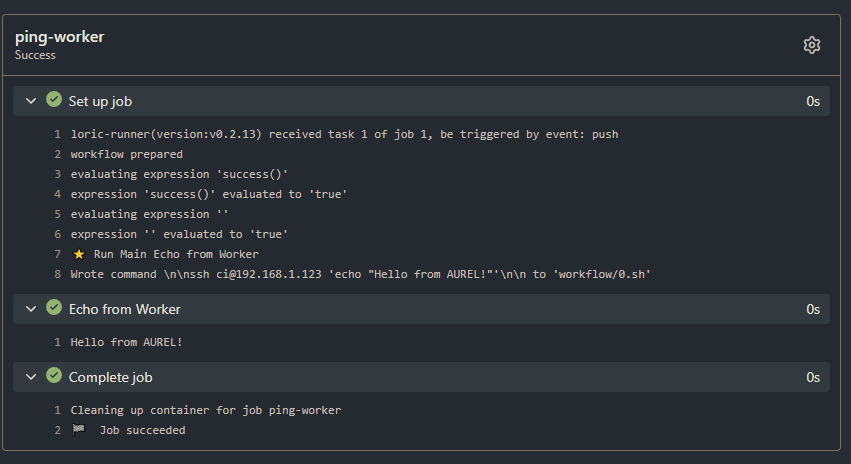 In the example image above, you can see the worker is successfully running my gitea workflow test.yml within my CICD-Test repo. The test.yml is to instruct commands under the ssh.
name: Test Worker Connectivity

on:
  push:
    branches:
      - main

jobs:
  ping-worker:
    runs-on: pi3  # label matches LORIC and AUREL worker
    steps:
      - name: Echo from Worker
        run: ssh ci@192.168.0.123 'echo "Hello from AUREL!"'
10. Setting Up Docker Context
These commands will setup docker context for LORIC. LORIC also has docker installed and running which can perform builds and other tasks, however their role is to simply only handle requests from CASPER and tell other devices within my setup to do more of the heavy lifting.
When a workflow runs:
- CASPER has a job that LORIC runs.
- LORIC prepares workflow.
- Docker commands execute using active context.
- Workloads run locally or remotely.
- Containers clean up normally after job.
If the runner is busy:
- Jobs queue in Gitea upon CASPER
We use this command below to ensure what types of context is available.
docker context ls
NAME      DESCRIPTION                               DOCKER ENDPOINT               ERROR
aurel *                                             ssh://ci@192.168.0.123
default   Current DOCKER_HOST based configuration   unix:///var/run/docker.sock
Docker contexts can be created with the following command:
docker context create aurel \
  --docker "host=ssh://ci@192.168.0.123"
Next we tell LORIC to use AUREL for docker usage.
docker context use aurel
After this:
docker buildruns on AUREL.docker runruns on AUREL.- Images and containers live on AUREL.
Notes
- CASPER never talks to workers directly; all execution flows through LORIC.
- Runner binary located at:
~/gitea-runner/act_runner. - Docker must remain installed and updated for workflows that use containerized jobs.